
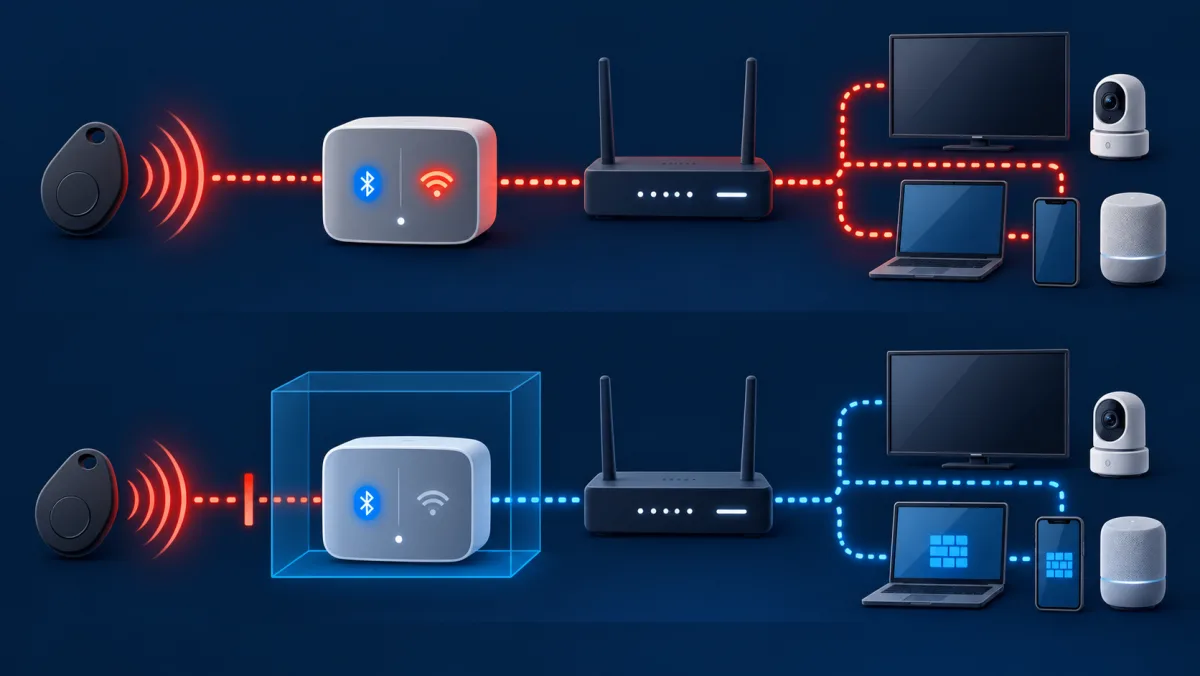
Bluetooth-to-network pivot model
The upper path shows the conditions that can turn one dual-radio device into a network position. The lower path contains that same device before it can initiate connections to trusted systems.
| Boundary | Unsafe condition | Contained condition |
|---|---|---|
| Bluetooth | Unexpected pairing, old bond, weak method, or unpatched service | Authenticated pairing, current firmware, minimal profiles, and no idle pairing mode |
| Bridge device | Bluetooth and Wi-Fi are both available with broad permissions | Only required interfaces, accounts, and services remain enabled |
| Local network | One flat segment permits device-to-device initiation | IoT zone cannot initiate connections to trusted systems |
| Target | Open sharing, weak credentials, outdated software, or reused trust | Host firewall, current software, unique credentials, and restricted sharing |
| Evidence | No inventory, logs, or expected communication baseline | Known devices, preserved events, negative tests, and reviewed changes |
Changing a device address is not shown as a containment control because it does not remove the vulnerability, bond, permission, network route, or target weakness.
Terms that separate Bluetooth access from network spread
The stages are connected but not interchangeable. Naming the proven stage prevents a nearby signal from being reported as a whole-home compromise without supporting evidence.
Initial access
The first successful pairing, bond reuse, exposed service, account action, or software exploit that gives the attacker useful access to one device.
Dual-connected device
A phone, computer, hub, speaker, controller, or other system that can communicate through Bluetooth and through Wi-Fi, Ethernet, cellular service, USB, or a cloud account.
Pivot
Using control of one device or account as a position from which to reach another system or trust boundary.
Lateral movement
Attempts to access additional devices, services, accounts, or data after the first compromise. An attempted connection is not proof that the target was compromised.
Network segmentation
A router, firewall, VLAN, guest network, or other enforced boundary that limits which zones can initiate communication with each other.
Address privacy
Bluetooth Low Energy can rotate private addresses to reduce passive tracking. This privacy mechanism does not provide software updates, service authorization, or network isolation.
Know the conditions required for a network pivot
A nearby Bluetooth signal is not the same as control of a device, and control of one device is not automatically control of a home network. For a real pivot, several conditions normally have to align. The attacker needs a way to pair, exploit, or reuse trust with the first device. That device must run code or expose a function that gives meaningful control. It must also have Wi-Fi or Ethernet access, and the network must permit communication toward another useful target.
The final target then needs its own weakness, such as an exposed administration page, weak credentials, outdated software, unsafe file sharing, or a trusted session that the first device can abuse. Breaking any one of these conditions can stop the chain. This is why a supported headset on its own is a different risk from a smart hub that uses Bluetooth for setup, Wi-Fi for cloud access, and a flat local network for device control.
| Required condition | Question to ask | Control that breaks the chain |
|---|---|---|
| Nearby access | Can an unknown device reach or pair with the Bluetooth service? | Close pairing mode, reject prompts, use authenticated pairing, and reduce radio use |
| Useful control | Does the flaw provide code execution, sensitive data, input, or configuration access? | Patch, restrict permissions, reset unsafe bonds, and retire unsupported hardware |
| Network bridge | Does the affected device also use Wi-Fi or Ethernet? | Remove unnecessary network access or place the device in an isolated zone |
| Reachable target | Can that zone initiate connections to computers, phones, storage, or router administration? | Default-deny inter-zone policy and host firewalls |
| Second weakness | Can the target be accessed with a flaw, shared password, open service, or trusted session? | Unique credentials, updates, limited sharing, and strong account protection |
Identify devices that can bridge Bluetooth and the network
The most important devices are those with more than one communication path. Phones, tablets, laptops, smart speakers, home hubs, televisions, streaming boxes, cars, security systems, medical accessories, and some appliances can use Bluetooth while also reaching Wi-Fi, Ethernet, cellular service, or a cloud account. A successful compromise on one of these devices may provide a position from which the attacker can observe or attempt local network connections.
A simple pair of headphones usually does not have a route into the home network, although the phone or computer paired to it does. A tracking tag broadcasts Bluetooth but normally is not a general-purpose network gateway. A Bluetooth-to-Wi-Fi hub is more relevant because bridging is part of its job. Inventory actual interfaces and data paths instead of assigning the same risk to every device carrying a Bluetooth logo.
| Device type | Possible second path | Main review |
|---|---|---|
| Phone, tablet, or laptop | Wi-Fi, cellular, USB, accounts, and local sharing | Updates, app permissions, firewall, sharing, and account sessions |
| Smart speaker or home hub | Wi-Fi, cloud service, local discovery, and device control | Supported firmware, account security, local reachability, and isolation |
| Television or streaming device | Wi-Fi, Ethernet, casting, microphone, and cloud account | Updates, discovery, app access, and device-network policy |
| Lock, alarm, or garage controller | Hub, Wi-Fi, account, and physical control | Recovery, guest access, logs, updates, and safe failure behavior |
| Headphones, keyboard, or mouse | Usually the paired host rather than direct LAN access | Pairing method, saved hosts, firmware, and the host's security |
Understand the realistic impact without exaggerating it
A compromised device can create serious consequences without physically destroying electronics. Credible outcomes include stolen messages or credentials, microphone or camera access, changed smart-home settings, locked accounts, deleted files, ransomware, disabled cameras, altered access permissions, network outages, participation in a botnet, or attacks against another local device. Safety consequences can matter when a vulnerable product controls a door, alarm, heater, medical function, vehicle feature, or other physical process.
Permanent electrical destruction is not the normal result of a Bluetooth attack and should not be presented as inevitable. It would require device-specific control over firmware, power, charging, thermal limits, actuators, or another safety-relevant function. Most household incidents are better described as loss of confidentiality, control, availability, or trustworthy operation. Use the exact device capability and observed evidence before claiming that hardware has been damaged.
| Impact | Plausible example | Evidence to preserve |
|---|---|---|
| Data exposure | Contacts, messages, recordings, credentials, or local files accessed | Permission changes, sessions, alerts, file history, and timestamps |
| Loss of control | Lock, camera, speaker, or automation settings changed | Account activity, device logs, member list, and configuration export |
| Service disruption | Devices disconnected, settings erased, traffic flooded, or storage encrypted | Router events, error messages, backups, and affected time window |
| Physical consequence | A safety-relevant function is operated outside its intended limits | Manufacturer logs, sensor state, service records, and professional assessment |
Build a home network that contains a compromised device
Place smart-home and less-trusted devices on a separate guest, IoT, or device network when the router can enforce isolation. The boundary should block new connections from that zone to personal computers, work devices, storage, router administration, and other sensitive systems. Internet access can remain available when required. Add only the narrow local exception needed for a trusted controller, printer, casting receiver, or hub, and test that the reverse direction stays blocked.
A second Wi-Fi name is not proof of segmentation. Confirm that the router created a separate network and policy rather than another label for the same local segment. Check IPv4 and IPv6, wired and wireless paths, client isolation, multicast discovery, and router management. CISA notes that segmentation can prevent devices in different home groups from communicating, while NIST recommends separating IoT devices with known risks from everyday computing devices.
- Keep router administration available only from a named trusted network and disable internet-side administration unless it is deliberately secured.
- Use host firewalls on computers even when the router isolates smart devices.
- Allow discovery relays only for the services that need them, because broad discovery can restore unnecessary reachability.
- Keep work devices and sensitive storage outside the IoT zone.
Harden the devices that could become a bridge
Enable automatic security updates where the product supports them, and record the model, firmware, account owner, paired devices, network zone, and expected communication. Replace products that no longer receive security fixes when their role is sensitive or their network access cannot be limited. Change default credentials, use a unique account password, enable strong multifactor authentication when available, and review household members, guests, integrations, recovery methods, and third-party application access.
Disable unused Bluetooth profiles, local sharing, remote support, developer interfaces, file sharing, media servers, and administration services. Keep the phone or computer firewall enabled on every network profile. Do not reuse the router administrator password, Wi-Fi password, product account password, or device PIN. If a hub needs only specific internet destinations or local controllers, use router access controls or a supported Manufacturer Usage Description feature to limit communication to that expected behavior.
- Reset and remove old bonds before transferring, returning, or selling a device.
- Do not keep unsupported hardware online merely because its basic function still works.
- Protect cloud accounts because a remote account takeover can bypass local Bluetooth and network controls.
- Back up router, hub, automation, and access-control configurations before an incident.
Detect movement beyond the original Bluetooth device
Start with a known inventory and expected communication. NIST IR 8349 explains that understanding normal IoT network behavior helps apply access controls and identify misbehavior that may indicate compromise. At home, useful signals include a new router client, an IoT device contacting unexpected local addresses, repeated connection attempts toward laptops or storage, unfamiliar administrator sessions, sudden DNS or traffic changes, disabled cameras, or device settings that change without a household action.
One unusual connection is not proof of lateral movement. Match the device identifier, source address, destination, time, protocol, account event, and affected function. Consumer routers may provide only limited logs, so preserve screenshots and exports quickly. Check the target device too: host firewall logs, sign-in history, sharing settings, antivirus alerts, new applications, account sessions, and file activity can show whether the attempted connection succeeded or remained blocked.
| Signal | What it could mean | Next check |
|---|---|---|
| Unknown router client | New household device, address randomization, or unauthorized access | Identify owner, manufacturer, connection time, and network credentials |
| IoT device scans local addresses | Discovery, malfunction, update behavior, or compromise | Compare with expected function and vendor documentation |
| Repeated blocked host connections | Misconfiguration or attempted lateral movement | Match source device, service, timing, and target logs |
| Cloud account changes | Remote takeover unrelated to the local radio path | Review sessions, recovery methods, integrations, and MFA |
| Device settings change | Household action, automation, vendor update, or unauthorized control | Review audit history and every authorized member |
Contain a suspected Bluetooth-to-network incident
Preserve the Bluetooth prompt, saved-device record, router client list, account alerts, device logs, screenshots, and exact time before resetting equipment. Disconnect the suspected bridge from Bluetooth and from Wi-Fi or Ethernet when immediate containment is needed. If it controls a lock, alarm, medical device, heater, vehicle, or another safety-relevant system, arrange a safe manual alternative and contact the manufacturer or an appropriate professional before removing power or erasing configuration.
Use a known-clean device to secure the primary email, platform, router, and product accounts. Remove unknown sessions and integrations. Update the router and affected products, then reset or rebuild the suspected bridge through its official recovery process. Rotate Wi-Fi credentials only when they may have been exposed or when unauthorized clients cannot otherwise be removed, because changing them without a reconnection plan can disable safety and monitoring devices.
- Record the first Bluetooth event, affected device, connection state, identifiers, and time.
- Save router clients, logs, account sessions, alerts, and changed settings.
- Move safety-relevant functions to a safe manual state.
- Disconnect the suspected bridge from Bluetooth and its network zone.
- From a clean device, secure email, platform, router, and product accounts.
- Update, reset, or rebuild the bridge using current manufacturer instructions.
- Inspect reachable targets for sessions, sharing changes, malware alerts, and file activity.
- Reconnect first to an isolated zone and test required and blocked paths.
- Document what was proven, what remains uncertain, and which unsupported device must be replaced.
Use Bluetooth address privacy correctly
Bluetooth Low Energy supports private addresses that change over time to make passive tracking harder. A resolvable private address lets a bonded device recognize the changing address through a shared identity resolving key. Current operating systems and Bluetooth controllers normally manage this behavior. It is a privacy feature for radio advertisements, not a patch, firewall, authentication method, or substitute for secure pairing and network isolation.
Manually changing a Bluetooth MAC address does not remove vulnerable firmware, close an exposed service, revoke a bond, or stop a compromised device from using Wi-Fi. It may break reconnection or create misleading inventory entries. A Wi-Fi private address is a separate feature used per wireless network and does not repair Bluetooth security. MAC allowlists are also weak access controls because visible addresses can be copied. Use supported address randomization, but rely on cryptographic pairing, updates, credentials, permissions, and segmentation for security.
| Measure | What it helps | What it does not solve |
|---|---|---|
| Bluetooth private address | Reduces long-term correlation of BLE advertisements by outsiders | Weak pairing, vulnerable code, excessive profiles, or a compromised host |
| Wi-Fi private address | Reduces tracking across or within Wi-Fi networks depending on platform mode | Bluetooth access or malicious traffic after joining the network |
| Manual MAC change | Limited testing or specialized administration when supported | Identity assurance, encryption, patching, or network containment |
| MAC allowlist | Basic inventory or convenience filtering | A determined attacker who can observe and copy an allowed address |
Verify that the home is resistant to lateral movement
Connect a test device to the IoT or guest zone and confirm it can perform its intended internet task while failing to open router administration, computer file sharing, remote desktop, phone services, network storage, and other sensitive local targets. Repeat the checks over IPv4 and IPv6. Test from a wired smart-device port too if the router or switch provides one. Confirm that a trusted controller can reach only the specific local service it needs.
Then review the affected device inventory, updates, account members, Bluetooth bonds, permissions, and network behavior. Reboot the router and hub and confirm the policy survives. Export the known-good configuration and write down recovery steps. Repeat the test after router firmware updates, adding a hub, changing discovery settings, replacing a phone, or enabling a new integration. Containment is proven by blocked paths and recorded evidence, not by the name of a guest network.
| Verification | Expected result | Failure response |
|---|---|---|
| IoT to trusted computer | New connections are blocked | Correct zone policy and host firewall before reconnecting devices |
| IoT to router administration | Blocked from the device zone | Restrict management sources and disable unnecessary remote paths |
| Trusted controller to hub | Only required service works | Replace broad access with a narrow exception |
| IPv6 path | Same intended isolation as IPv4 | Enable equivalent IPv6 policy or disable unmanaged service safely |
| Reboot and update | Policy and device assignment persist | Restore known-good configuration and document the platform limitation |
Bluetooth and home-network containment checklist
- Inventory every device that has both Bluetooth and Wi-Fi or Ethernet.
- Record firmware support, paired hosts, accounts, permissions, network zone, and recovery method.
- Place smart-home and less-trusted devices in a separately enforced IoT or guest zone.
- Block that zone from initiating connections to trusted computers, storage, and router administration.
- Keep host firewalls enabled on personal and work computers.
- Use unique credentials and strong multifactor authentication for router and product accounts.
- Remove old Bluetooth bonds, household members, integrations, and local services.
- Monitor router clients and unexpected local connection attempts against a known inventory.
- Preserve evidence before resetting a suspected bridge or rotating network credentials.
- Test the intended service and nearby blocked paths over IPv4 and IPv6 after every material change.
How to contain a suspected network pivot
From the isolated zone, confirm that the speaker can reach only its required internet and controller services. Attempts toward laptop sharing, storage, router administration, and other device-management ports should fail over IPv4 and IPv6. Review the targets for successful sessions or changes during the original time window instead of assuming that a blocked attempt caused damage.
Example: a smart speaker begins contacting home computers
A supported smart speaker uses Bluetooth for setup and Wi-Fi for streaming and control. After an unexpected pairing event, the router shows the speaker attempting repeated connections to a laptop and network-storage device. The attempts alone do not prove successful compromise, but they show why the speaker's network position matters.
Reconnect only devices that pass the boundary checks
Preserve the pairing event, router records, speaker account activity, destination services, and exact times. Disconnect the speaker from Bluetooth and Wi-Fi, secure its account from a known-clean device, and inspect the laptop and storage logs. Keep the speaker offline until it is updated or reset, then place it in an isolated IoT zone before testing it again.
Mistakes that leave a path across the home network
- Treating every Bluetooth prompt as proof that the entire network is compromised. A real pivot requires control of a dual-connected device, reachability, and another useful target.
- Assuming a headset, tracker, smart hub, laptop, and lock have the same network role merely because each supports Bluetooth.
- Placing IoT devices on a differently named Wi-Fi network without testing whether the router actually isolates local traffic.
- Using one shared administrator password for the router, cloud account, hubs, cameras, and storage.
- Disabling host firewalls because the router already has a firewall. Local zones and compromised devices can sit behind the internet boundary.
- Changing a MAC address and treating the new identifier as authentication, patching, or removal of a saved bond.
- Factory-resetting the suspected bridge before preserving pairing, network, account, and target-device evidence.
- Claiming physical destruction without device-specific evidence of altered firmware, power, thermal, actuator, or safety control.
Bluetooth network-spread questions
Can a Bluetooth attack spread to every device on my home network?
Not automatically. The first device must be meaningfully compromised, have another network path, reach other devices, and find a usable weakness or trusted access on those targets. Segmentation, host firewalls, updates, and unique credentials can break the chain.
Which Bluetooth devices create the greatest pivot risk?
Focus on devices that also use Wi-Fi, Ethernet, cellular service, a cloud account, or local device-control protocols. Phones, computers, hubs, speakers, televisions, cars, and access controllers can have several paths. A simple audio accessory usually relies on its paired host for network access.
Can an attacker permanently destroy smart-home electronics?
Permanent physical damage is uncommon and device-specific. More typical effects are lost data, unauthorized control, outages, changed settings, ransomware, privacy loss, or unsafe operation. Physical consequences require control over a relevant actuator, firmware, charging, thermal, power, or safety function.
Will changing the Bluetooth MAC address stop the attack?
No. Private Bluetooth addresses can reduce passive tracking, but an address change does not patch firmware, close a service, revoke a bond, remove malware, restrict Wi-Fi, or isolate the device. Use the platform's supported privacy feature and fix the actual access path.
Is a guest Wi-Fi network enough for smart devices?
Only if the router enforces the required separation. Test that smart devices cannot initiate connections to trusted devices or router administration over IPv4 and IPv6. Some guest modes isolate clients, while others only provide a different network name.
Should I rotate the Wi-Fi password after a suspicious Bluetooth event?
Rotate it if the credential may have been exposed or unauthorized clients cannot otherwise be removed. Preserve evidence first and plan the reconnection of locks, alarms, cameras, and other important devices. A password change alone does not clean a compromised device or account.
Bluetooth and home-network containment references
- NIST SP 800-121 Rev. 2, Guide to Bluetooth Security
- Bluetooth SIG, Security and Privacy Best Practices Guide
- Bluetooth SIG, Bluetooth Security and Privacy Best Practices
- NIST SP 1800-15, Securing Small-Business and Home IoT Devices
- NIST IR 8349, Methodology for Characterizing IoT Device Network Behavior
- NIST IR 8425A, Consumer-Grade Router Cybersecurity Requirements
- CISA, Federal Mobile Workplace Security Guidance